01 / 28
docket.
Concept · In TestingHiring · B2B SaaS

docket.

After interviews, feedback often comes in late and nobody can see who is holding it up. Docket shows hiring managers which candidates are waiting on them and for how long.

  • Research
  • Clickable prototype
  • 6 testers, 7 sessions
  • Figma file
Role Product Designer · UX/UIPlatform Web, desktop-first
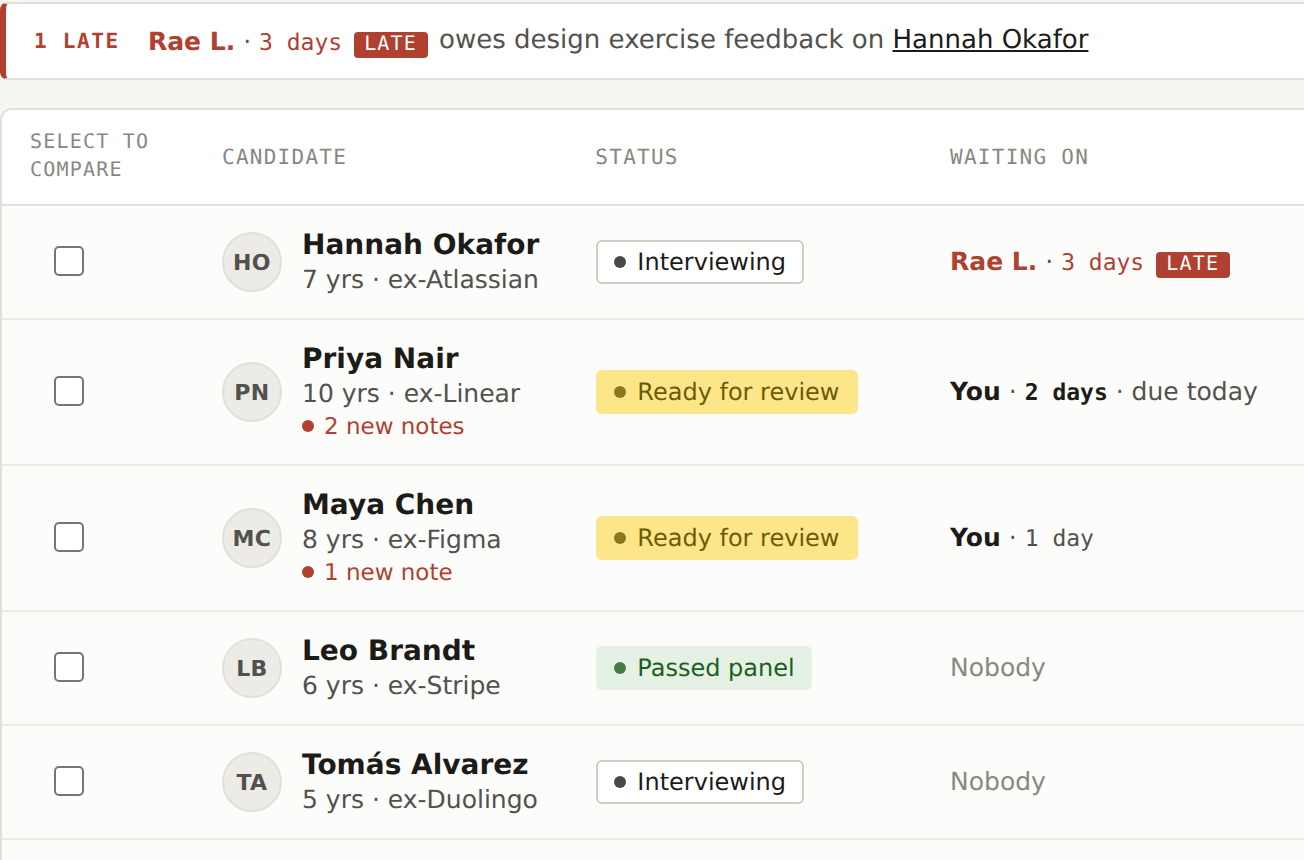
The Docket candidate list, showing who each candidate is waiting on and for how long
who is waiting on whom,
and for how long
Why I Built This · The Problem

Recruiters and hiring managers often work with different information.

I am applying to jobs right now, so I designed for the people on the other side: the hiring managers who decide whether to hire me. When a recruiter finishes a phone screen, their notes do not automatically reach the hiring manager, and decisions travel back through Slack, email or a quick call. My guess going in was that details get lost along the way.

Half right Hypothesis, not a finding

The research on the next pages tests this. Part of it holds up: the research pointed to slow feedback more than lost information.

Research · What the Data Says

The delay is real. The cause was not clear.

I did not have access to hiring managers, so I worked from published research, 15 public accounts from recruiters, interviewers and candidates, and four competing tools. I did not interview anyone, and every quote links to where I found it. One survey of more than 250 recruiters found:

Secondary data
67%

say hiring managers take 2+ working days to give feedback on a resume

and that is only the resume
59%

say it takes 2+ working days to debrief after an interview

46%

struggle to get hiring managers to separate must-have skills from nice-to-have ones

45%

rely only on basic email and messaging to communicate with hiring managers

Source: Phenom & Talent Board, 2021 Recruiter & Manager Report. The survey only asked recruiters, so this is their side of the story.
So what

I started out assuming information gets lost in the handoff. This data does not say that. It says hiring managers are slow to respond. Those two problems need different solutions, so finding out which one is true became the main question for the rest of my research.

Limits: most of the posts come from people at big tech companies, and most software reviews are written by recruiters rather than hiring managers. The findings lean that way.
Research · Competitors

What is already out there.

Checked against each tool's own help pages and product updates. Where I could not confirm something, the table says so.

ToolWhat it isHides others' feedback until you submit yoursBuilt for hiring managers
GreenhouseHiring software (ATS)Yes, on by defaultNo separate app. Hiring managers get an "Applications to Review" panel on the main dashboard.
LeverHiring software (ATS)Yes, as a team settingNo separate app found
AshbyHiring software (ATS)Yes, as a setting (added 2021)No separate app. Ready-made dashboards for recruiters and hiring managers (2023).
PhenomTalent platformnot statedYes, sold as a separate Hiring Manager app
DocketConceptPlannedYes, it is the whole product
What this means

Hiding feedback until you submit your own is already standard, so every tool needs it. Phenom already sells an app for hiring managers, so I am not the first to see this gap. Docket can stand out on speed by showing late feedback.

Research · What I Found

Three patterns across 15 accounts.

I tagged each post, review and quote by what it was about, then counted. Three accounts did not fit any theme.

01

Feedback is extra work, so it runs late.

7 of 15
the big one. almost half
"Interviewers being late to give feedback is very common especially in big companies."

Greenhouse's own guide lists the reasons people give: "I am busy" and "It is not my job."

02

The tools mostly work.

4 of 15
"Having a single system made collaboration between recruiters and hiring managers much smoother, w/o constant back-and-forth or status updates."

These reviews are written by recruiters. Hiring managers rarely review hiring software.

03

Hiring managers read candidates in their inbox.

1 of 15
"My favorite aspect about Lever is being able to send candidates profiles and notes to one of our hiring managers and it goes straight to their email."

Only one review, but it matches the survey: 45% of recruiters rely only on email and messaging.

How Might We

How might we make feedback and decisions quick enough that interviewers and hiring managers do not put them off?

My first version was about giving hiring managers more information. After the research, it is about time: feedback is extra work, so it gets pushed back.

I thought

Information gets lost between the recruiter and the hiring manager, so they need a better screen.

I found

The screens mostly work. Feedback is late because it is extra work, and hiring managers often read candidates in email.

So Docket changes

Docket now focuses on fast feedback and showing delays.

Show who is late In prototype

Each candidate shows whose feedback is missing and for how long, next to an agreed turnaround. SHRM suggests hiring managers review resumes within 48 hours.

Make feedback quick In prototype

Four ratings and two short notes, meant to take minutes instead of a long write-up.

Meet hiring managers in their inbox In prototype

A morning email listing who is waiting on them, with one click into the candidate's record. Shown in the prototype as a preview.

Rate before you read Planned

Interviewers submit their own rating before seeing others', based on Greenhouse's research on peeking.

The Big Idea

One screen for the person who makes the decision.

Most hiring software is built for recruiters, who work in it all day. Hiring managers open it a few times a week around their normal work, and the research says they are the slow step. Docket gives them one place to review a candidate and decide in the few minutes they have.

Most hiring tools
Docket
Built for
Recruiters
Hiring managers
Opened
All day
A few times a week
First screen
Every open role and stage
Who is waiting on you the whole idea
Job
Move many candidates along
Make one decision quickly

! What the reviews said

Several recruiters say today's tools already work fine for hiring managers. So Docket has to make feedback faster.

✓ Why not replace the ATS

Companies already pay for hiring software. Docket works alongside it instead of asking anyone to switch.

Who Uses It · Composite Personas

Two roles, one hire.

If you have applied for a job, you have met both. The recruiter usually contacts you first. The hiring manager is the person you would end up working for. These are composites, not real people: every line comes from the research or is a reasonable guess, and the photos are AI-generated.

Illustrative photo representing Daniel, the hiring manager persona Illustrative · not a real person
Primary user · Composite persona

Daniel, hiring manager

Hiring is about two hours of Daniel's week, squeezed between his other meetings.

Goals
  • Make a confident decision without re-reading everything from scratch
  • Give feedback the same day he interviews, not days later
  • See a candidate's whole picture instead of a scattered chain of emails and Slack messages
Frustrations
  • Gets pulled into a last-minute meeting right when he meant to review a candidate
  • Feedback feels like homework on top of his real job, so it slips
  • By the time he responds, the recruiter has already followed up twice
"Sometimes the hiring manager gets pulled into a last-minute meeting."

Illustrative photo representing Sam, the recruiter persona Illustrative · not a real person
Secondary user · Composite persona

Sam, recruiter

She is running hiring for several roles at once. Docket only has to solve the hiring-manager side of her job, but it cannot get in her way.

Goals
  • Keep every candidate moving without chasing hiring managers for an update
  • Get feedback back fast enough that good candidates do not take another offer
  • Use one system that already works, since most reviews say today's tools are fine for her side
Frustrations
  • Good candidates fall into a black hole waiting on the hiring manager
  • Falls back to email because there is no faster way to get a hiring manager's attention
  • Has to follow up more than once for the same candidate
"We've all experienced when a great candidate is sourced and sent to the hiring manager only to fall into a black hole where they never hear feedback."
Task Flow · Hypothesized

Where I think the handoff happens.

This is my best guess at the workflow, based on the research. There are two points where information has to pass from one person to the other, and Docket is meant to handle both without anyone writing a message.

Recruiter
01

Screens the candidate

The first phone call happens outside Docket, the same way it does now.

02

Logs the record

Adds the resume, cover letter and interview ratings to the candidate's record.

03

Marks it Ready for Review

Changes the status so the hiring manager knows it is their turn. No email needed.

Handoff 01

The resume, notes, ratings and status all move together on one record.

Hiring Manager
04

Opens the record

Sees the resume, ratings and interview notes on one page.

05

Compares finalists

Puts two or three candidates side by side, rated on the same criteria.

06

Moves the status

Picks the next step, for example Interviewing, Offer Extended or Not Moving Forward.

Handoff 02

The recruiter sees the new status right away, without having to ask.

Recruiter
07

Follows up with the candidate

Contacts the candidate about next steps as soon as the status changes.

Design

Like a work tool.

I wanted Docket to feel like a serious work tool, so I borrowed a few details from paper case files: a stamp for status, and handwritten notes. Most work software is blue. Paper colors fit the case-file idea better.

Paper
Ink
Yellow
Stamp red
Status
Needs you
Ready for review
In progress
SchedulingInterviewing
Good news
Passed panelOffer extended
Hidden
Not moving forwardWithdrew
Yellow only ever means "it is your turn." Nothing else in the product uses it.
Type
Plex Sans
CandidatesButtons, labels, tables
Plex Serif
Clear on why she is leaving.Resumes, cover letters, interview notes
Plex Mono
CAND-0412 · Sep 22 · 3/4IDs, dates, counts
Components
Rating
4/5
Interviews
done, done, booked, not booked
Verdict
Strong yesYesNo
Accessibility
  • Color never works alone. Every status and the Late tag are words, and interview progress uses shape: filled, dashed, empty.
  • All text in the prototype meets WCAG AA contrast (4.5:1). I checked every screen and darkened the gray to pass.
  • The compare chart has a table view with the same numbers.
  • Each compare checkbox names the person it selects, and motion turns off for people who set their device to reduce it.
Key Screens · 01 of 03

See who is waiting on you.

  1. One real tab. Requisitions and Reports are grayed out to show where it could grow.
  2. Yellow means it is ready for your review. No other status uses yellow.
  3. Interview progress without opening anything: filled is done, dashed is booked, empty is not booked. The overall score sits next to it.
  4. Filters with a count on each, plus a sort. After testing, the list opens with whatever is late or due first.
  5. Each row has one checkbox. Check any rows and a bar appears at the bottom to Compare or Archive the selection.
  6. Added after the research: whose turn it is and for how long. Past the team's 2-day goal it gets a red Late tag, the same one used in the bar at the top.
Open this screen →
Key Screens · 02 of 03

Everything about one person, on one page.

  1. A "Your decision" box names the next step on a button. Afterward it says what moved, with Undo, and the recruiter sees it right away.
  2. Next step is plain text the recruiter types after booking. Docket does not schedule.
  3. Interviews and notes, documents, and activity are tabs inside the candidate.
  4. What interviewers said comes first: every pro and concern, with the recommendations. The overall score and full notes sit below.
  5. Concerns are in bold, since a tester only found them at the bottom of each interview.
  6. Added after the research: who the candidate is waiting on, for how long, and the team goal, in plain words.
Open this screen →
Key Screens · 03 of 03

Finalists side by side.

  1. Grouped bars instead of a radar chart. Bar heights are easier to compare.
  2. Each person keeps the same color, even if someone is removed from the comparison.
  3. The same numbers as a table, for anyone who cannot read the chart.
  4. Each person's own words, recommendations and notes side by side, with a button to move them forward right here.
  5. Added after testing: one overall score per person, since a tester wanted a single number to compare by.
Open this screen →
Prototype

Clickable prototype.

A working version of the three main screens: the candidate list, a candidate's record and the compare view. The candidates are made up. The reasons behind each decision are on the Key Screens pages.

Open prototype →
Open the clickable prototype →Open the Figma prototype →View the Figma file →
3 screens9 sample candidatesInteractive HTML versionFigma prototype, 4 flowsTested with 6 people, 7 sessions
Iteration · What the Research Changed

Making late feedback visible.

I built the first prototype before the research. The research said the problem is slow feedback, and the first version had nothing that showed it. So I added it.

Before

The status says whose turn it is, but not for how long. A candidate who has been stuck for days looks the same as one who arrived an hour ago.

After new: who is late, and for how long

1 A bar at the top lists anyone past the team's goal. 2 A new Waiting on column shows whose turn it is and for how long, and turns red when it is late. Try it on Hannah Okafor's record →

What the research said

Feedback runs late because it is extra work (7 of 15 accounts), and SHRM suggests hiring managers review resumes within 48 hours.

What I changed

A 2-day team goal, a Waiting on column, a late bar, and a Send reminder button inside the candidate's record.

What testing said

Mazzy could not tell whose side the hold-up was on. After I reworded it, Leo, Conner and Johnny all got it right away, 5/5 sure. Ash, Mazzy and Leo all said seeing "Late" helps.

Usability Testing · 6 testers, 7 sessions

Same five tasks, every round.

I ran each session and wrote down what the tester did and said. Ash tried two versions, Mazzy and Leo each tried a fixed one, and then Conner, Johnny and Brett saw Docket for the first time, to check the fixes hold up for fresh eyes. I fixed what came up after every round.

Done
TaskAsh · R1, R2Mazzy · R2Leo · R3Conner · newJohnny · newBrett · new
Find who is waiting on youR1 · ConfusedR2 · Found itFound itFound itFound itFound itFound it
Remind whoever is holding up HannahDoneStuckDoneDoneDoneDone
Move Maya to the next stepR1 · StuckR2 · DoneStuckDoneDoneDoneDone
Compare the finalists and pick oneR1 · StuckR2 · DoneNeeded a hintNeeded a hintMissed the checkboxesStuckRead checkboxes as delete
Act on the morning emailR1 · Not testedR2 · DoneDoneDoneDoneNot askedNot asked
What stood out

Once fixed, finding, reminding and moving a candidate worked for every new tester, 5/5 sure. Comparing was the hard one: in five of seven sessions someone needed help, mostly because the checkboxes read as move or delete. Brett summed up the rest: "Pretty easy, 5 out of 5."

Iteration · What Testing Changed

Fixing where people got stuck.

Every change here came from something a tester did or said. The biggest one: Mazzy could not tell whose side the hold-up was on, which is the exact problem the research pointed to.
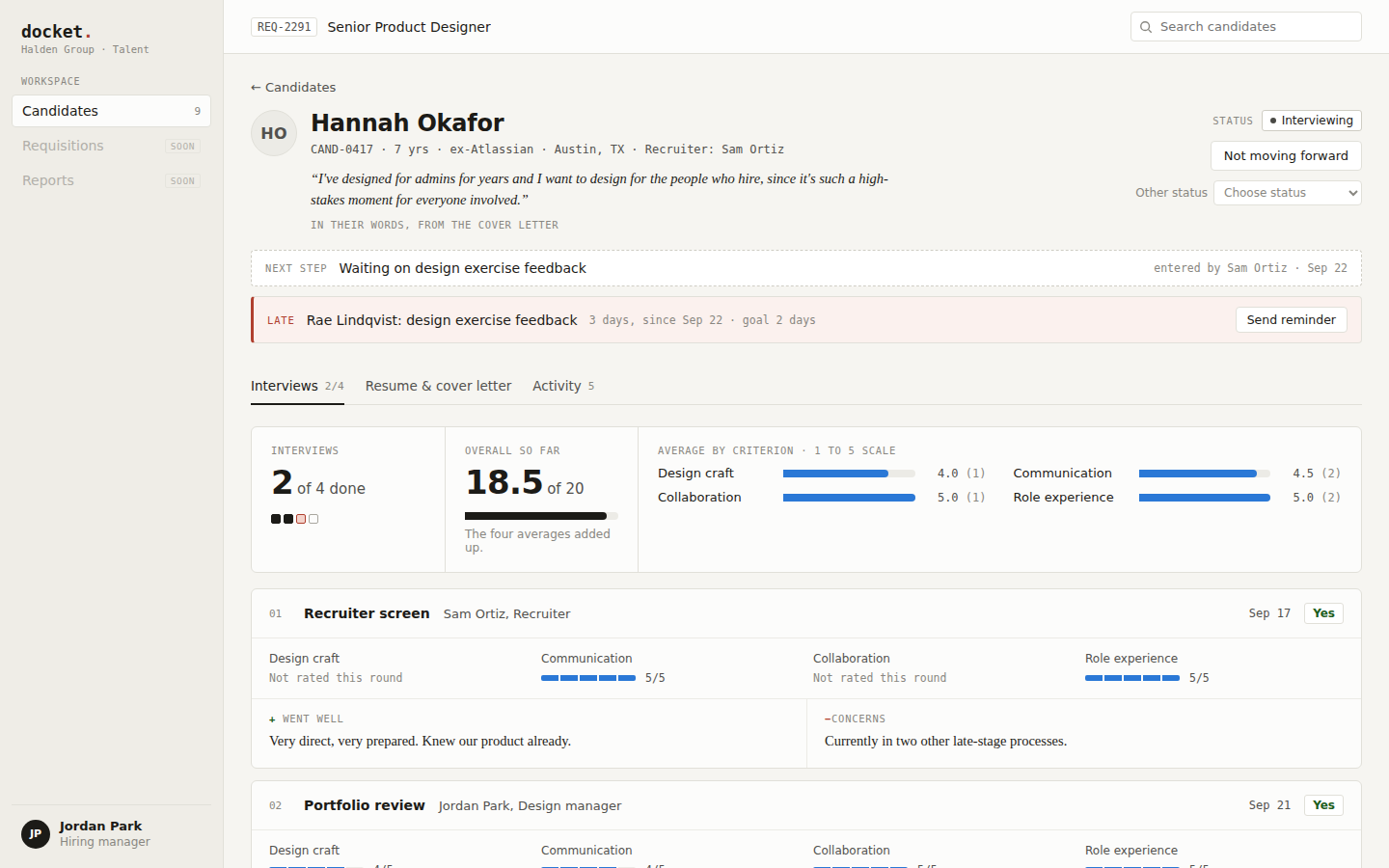
Before · round 2

"Waiting on Rae Lindqvist" and a Send reminder button. Mazzy could not tell if the problem was the team's or Hannah's, or what the button would do.

After

1 It says in plain words that the hold-up is on the team, not Hannah. 2 The button says who the reminder goes to and how. 3 A "Your decision" box says whether you need to do anything. Leo and every new tester after him got it right away, 5/5 sure. Try it →

What testers hitWhat I changedResult
"Awaiting you" and "Waiting on: You" read as the same thing (Ash)Renamed the status Ready for review, and added one Waiting on you filter.Everyone after found it
Did not know how to move Maya forward (Ash, Mazzy)A "Your decision" box with a button that names the next step. Afterward it says what moved, with Undo.5/5 from round 3 on
Could not tell whose side Hannah's hold-up was on (Mazzy)It says in plain words that the hold-up is on the team, and the button reads "Remind Rae."5/5 from round 3 on
Found the concerns only at the bottom (Mazzy)Every interviewer's pros and concerns come first, concerns in bold.Built
Wanted one number and a way to sort (Ash, Mazzy, Leo)An overall score out of 20 in the list. Every column title sorts, and the list opens with what is late or due.Built
Checkboxes read as move or delete, and there were two Compare buttons (5 of 7 sessions)One checkbox selects a row, and a bar at the bottom lets you Compare or Archive. One Compare button, highest score first.Rebuilt. Testing next
Wrap Up

How I would know it works, and what I learned.

Docket has not shipped, so there are no results here. These are the numbers I would track, starting with one hiring team using it for a month.

Proposed · not measured
What I would trackWhy it mattersComes from
Days from interview to feedbackThe research said feedback runs late because it is extra work. This is the main number Docket should shrink.Research, 7 of 15 accounts
Feedback turned in within the 2-day goalThe Late tag is built around this goal. If this share does not go up, the tag is not changing anything.SHRM's 48-hour guideline
Days from finalists to a decisionCompare and the Your decision box exist to make this part faster.Key screens 02 and 03
What surprised me

I went in sure the problem was lost information. The research pointed to slow feedback instead, and recruiters' reviews said today's tools already work fine. So I changed Docket to focus on showing delays.

What I would do differently

Research first, screens second. I built the prototype before the research, so the biggest change was added on top instead of shaping it from the start. I would also look harder for hiring managers' own words, since most public reviews come from recruiters.

What is next

Test the rebuilt Compare with someone new, since comparing is the task most testers missed. Then build rate before you read, the last change the research pointed to.

Project Status

Where it stands, and what is next.

ResearchDone. 15 firsthand accounts, 6 published sources, and 4 competing tools checked against their own help pages.
PrototypeSixth version. Three clickable screens and a morning email, with the fixes from every round of testing.
Testing6 testers, 7 sessions. Every fix worked except comparing, which I rebuilt after the last round.
NextTest the rebuilt Compare with someone new. Then build rate before you read.

This is a concept, so the real test would be a hiring team using it for their actual hires.

Sources (26)

Published research (6)

  1. Phenom & Talent Board, 2021 Recruiter & Manager Report
  2. Greenhouse, How scorecard peeking can create bias in hiring
  3. Greenhouse, Tips for improving scorecard submission rate
  4. Metaview, Recruiter and hiring manager alignment
  5. SHRM, 5 tips for better communication with hiring managers (2022)
  6. SHRM, Sharpen your recruiting workflow with service-level agreements (2020)

Competitor documentation (5)

  1. Greenhouse Support, Hiring team role: Hiring manager
  2. Lever Help Center, Why can't I see a candidate's feedback?
  3. Ashby, More feedback visibility options (2021)
  4. Ashby, Default job dashboard (2023)
  5. Phenom, Hiring Manager app

Firsthand accounts (15)

  1. Blind: feedback still isn't submitted theme 01
  2. Blind: is this a normal timeline? theme 01
  3. Blind: delays waiting for feedback or offer theme 01
  4. Blind: when do interviewers write feedback? theme 01
  5. Blind: why is interview feedback so slow? theme 01
  6. The Muse: a recruiter and hiring manager explains delays theme 01
  7. SHRM: Andre Boulais on the feedback "black hole" theme 01
  8. Capterra: Greenhouse review, Joanna K., Recruiting Manager theme 02
  9. Capterra: Lever review, Samanta J., Head of Talent Acquisition theme 02
  10. Capterra: Lever review, Cara D., Recruiter theme 02
  11. Capterra: Lever review, Payton H., Talent Acquisition Specialist theme 03
  12. Capterra: Greenhouse review, Daniel K., Customer Support Manager theme 02
  13. Blind: taking forever after hiring manager interview other
  14. Capterra: Lever review, Garima M., Senior Manager Talent Acquisition other
  15. Capterra: Greenhouse review, Sherry S., HR Manager other